For adult children
Help for your aging parent, without another thing on your plate.
Mimi Care is a voice-first helper for your parent. Setup takes about 5 minutes for you and about 5 on their phone. They have a patient voice between your calls. You handle the plan and payment. Scam alerts can come to your phone. The dignity stays theirs.


We’re welcoming families a few at a time, so there may be a short wait after you sign up.

What it looks like
You set everything up once.
About 5 minutes for you, and about 5 on their phone: that's the setup. After that, Mimi Care is there when they need it, so your calls home can be about more than the mail.
About 5 minutes to set up.
You tell Mimi Care about them, choose a plan and text them a code (or show them a QR code). They type the code and a PIN on their phone, and you approve it.
Billing stays with you.
Your card, your email, your subscription. Your parent never sees a payment screen and never needs a password.
Scam alerts come to you.
Scam warnings are shared unless they turn that off. When Mimi Care flags something and you have scam alerts on, your phone gets a notification, so you can check in without needing an excuse to call.
How it helps day to day
The everyday questions, handled.
These are the kinds of calls Mimi Care can take off your plate, so you and Mom can talk about something else.
- 1
"What does this letter mean?"
She photographs the letter. Mimi Care reads it in plain language and points out anything suspicious.
- 2
"I can't figure out this screen."
He takes a screenshot. Mimi Care explains what it's asking, in a warm voice at a patient pace.
- 3
"When do I take this medicine?"
You turn on medicine reminders and they say yes. Mimi Care reminds them at the time, every day it's due.
Why it matters
You're carrying a lot. Mimi Care is built to carry some of it.
Families of aging parents do a lot of unpaid, invisible work: reminding about medicines, explaining screens, sorting mail, catching scams, answering "is this real?" Family caregivers spend about 24 hours a week on care, according to AARP and the National Alliance for Caregiving's 2020 report, Caregiving in the U.S.
Mimi Care is designed to give some of that time back. Not by replacing the caring (your calls matter, your visits matter), but by handling the ordinary frustrations that clog up those calls: the pop-up that wouldn't go away, the Medicare letter that looked scary, the bill they weren't sure about. So when you talk, you actually get to talk.
And because Mimi Care is voice-first and built for older adults (no passwords for them, big text, patient pacing), your parent can ask Mimi Care the way they'd ask a patient person in the room.
What families usually ask.
Will my parent actually use Mimi Care?
The main thing they do is talk, or show Mimi Care something with the camera. No passwords for them. Mimi Care is designed for someone who has never installed an app on their own.
What if my parent has dementia or memory loss?
Mimi Care is built for one step at a time: short questions, plain words, an easy "no." Mimi Care isn't a medical device and isn't a replacement for care, but is gentler than most apps.
Can I see what my parent got help with?
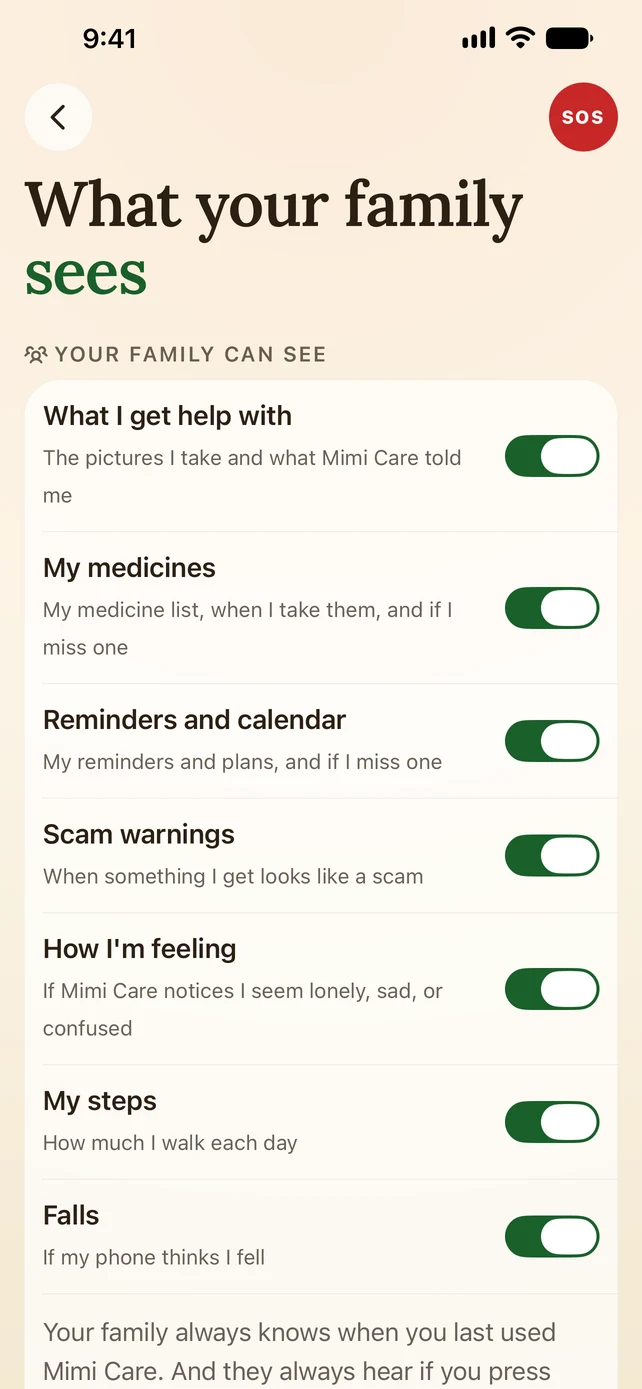
Helps are private by default. You always see when they last used Mimi Care and how often. If they share "What I get help with," you can open each help, with the photo and what Mimi Care explained. They choose what they share and can change it anytime. Scam warnings are shared unless they turn that off.
What happens if a payment fails?
If a payment fails we email you, and the plan stays active for a few days while we try again. (Plans through the App Store or Google Play are billed by Apple or Google.) If it still can't go through, their app says "Service paused" and asks them to check with you: no scolding, no payment screen for them. Their medicine reminders still come.
Can I set it up for both of my parents?
Yes. Family 2 covers two people and Family 3 covers three. Each person on a Family plan gets their own monthly helps and voice minutes, not shared: if Dad barely uses his and Mom uses all of hers, his don't carry over to her. See pricing for the details.
Help them stay independent.
Set it up today, on your phone or right here.
Create your accountWe’re welcoming families a few at a time, so there may be a short wait after you sign up.